By now, you’ve probably heard of Pinterest. But if you still don’t have a solid Pinterest marketing strategy, it’s time to change that!
Pinterest is a visual discovery engine for finding ideas like recipes, home and style inspiration, and more (Source: Pinterest)
One of the biggest misconceptions about Pinterest is that it’s a social media platform. While there is a social aspect involved, it’s actually not a social media platform at all; it’s a visual search engine.
Everyday, your audience is on Pinterest looking for ideas just like yours. In fact, there are about 431 million people using Pinterest as of the fourth quarter of 2021.

During the Covid-19 pandemic, Pinterest saw a major increase in users who were spending more time at home and online. With so many new users, now is a great time to improve your Pinterest marketing strategy, build brand awareness, and share your content with a whole new audience.
Below are my tips for ultimate Pinterest growth.

1. Set Up A Pinterest Business Account
If you’re a business owner using a personal Pinterest account, it’s time to convert to a business account.
This will give you access to a variety of important business features such as rich pins, Pinterest ads, messaging for your business, Engagement tab access, in-depth analytics, and more!
Tip: Don’t worry! If you want to continue using your personal Pinterest account for things like planning your wedding, sharing a recipe, decorating your kitchen, etc. and don’t want to convert it a business account, you can always create a new account specifically for your business.

2. Optimize Your Pinterest Profile with Keywords
Your profile may seem pretty straightforward, but it gives you an opportunity to introduce yourself, share what you do, and connect with your audience using an engaging call to action.
There are 5 essential parts to your Pinterest profile.
- Username – Just like other platforms, Pinterest allows you to have a username so people can find you. It looks like @yourusername. You should keep this consistent across all platforms to help people find you easily. For instance, you’ll find me @assimilationdesigns on just about every platform.
Your username can be 3-30 characters, and can’t have spaces, symbols or punctuation. - Website – No profile is complete without a link to your website, blog, or online store. Your website is the backbone of your online presence, so including it is a must. You also want to go one step further by claiming your website on Pinterest. This way, you can access important analytics connected to your site regarding content that you and others are sharing. Once claimed, you’ll also see the checkmark symbol next to your website address.
In addition to claiming your website, you can also claim your Instagram account, Etsy, or YouTube account. If you use Shopify for your website, you can install the Pinterest app on Shopify to add your name and profile picture to Pins from your Shopify store, automatically connect your catalog and install the Pinterest tag. - Profile Photo – Your profile photo is the main image associated with your Pinterest account. It should be kept consistent across all your platforms, so I suggest using your logo or an image of yourself.
Image Guidelines- Recommended size: 180 x 180 pixels
- Maximum size: 10 MB
- Image type: JPG or PNG
- Profile Name – This is the main title right next to or below your profile photo. You should include your business name and briefly summarize what you do in a few words. This is a good (and often overlooked) spot to include keywords. Remember, Pinterest works like search engine so keywords are highly useful.
- Profile Description/Bio – In this section, you want to focus on the “who” and “how” of your business in 160 characters or less. In other words, who you are serving and how you can help them. Again, this is a good opportunity to use keywords. You can use the same ones used in your profile name to keep things consistent.
Tip: Need help finding keywords for your business? Take a look at what’s trending on Pinterest for some ideas!
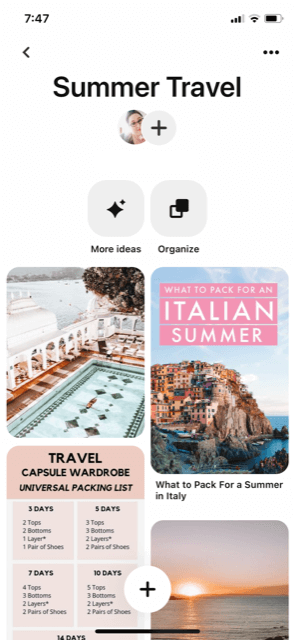
3. Create Valuable Content for Your Audience + Use Relevant Titles
Creating valuable content is an essential part of targeting your ideal audience.
Consider who your target person is. Are they an interior designer? Wellness advocate? Beauty blogger? Home baker?
Targeting a specific audience will ensure you are getting in front of the right people, helping your ideal customers find your content and products or services.
Content Examples:
Content ideas for Interior Designers
- Home inspo
- Minimal interior decor
- Color trends
- Bedroom redesign
- An opt-in like “Scandinavian Styles for Your Living Room”
Content ideas for Wellness Brands
- Yoga or meditation tips
- Exercise tutorials
- Healthy recipes
- An opt-in like “50 Wellness Tips To Change Your Life”
Content ideas for Beauty Bloggers
- Quick makeup or beauty tutorials
- Favorite vegan beauty products
- Makeup dupe products
- An opt-in like “Top 10 Beauty Industry Podcasts You Should Listen To”
Content ideas for Home Bakers
- Gluten-free recipes
- 10 baking tips and tricks
- Essential tools or must-have items for the kitchen
- An opt-in like “How to Make Cupcakes From Scratch in 30 Minutes”
The titles you use for your boards are equally important. It’s a good idea to name your boards according to the content being shared, and to (once again) incorporate relevant terms and keywords here. These terms are searchable and will help users find your content easily. 2-3 words for your titles is enough. The goal is to be simple and specific, and keep your boards consistent.
Board Title Examples:
Board title ideas for Interior Designers
- Farmhouse Decor
- Boho Bedroom Ideas
- Kitchen Renovation Tips
Board title ideas for Wedding Planners
- Simple Wedding Dresses
- DIY Wedding Centerpieces
- Wedding Hairstyles
Board title ideas for Fitness Coaches
- Gym Workouts
- Fitness Tips
- Meal Prep
Board title ideas for Copywriters
- Website Copywriting Tips
- Copywriting for Beginners
- Sales Copywriting
Tip: If aesthetic is important to you, use board covers for each board to make them more cohesive in appearance. This is also a good way to integrate your brand colors and fonts.

4. Use Optimal Image Sizes + Create Compelling Visuals
When pinning your content, it can be confusing to know what size your images should be. Use the handy guide above to create perfectly sized that stand out and grab attention. Your viewers (and Pinterest) will thank you for it!
Also keep in mind that that “the best pins are visually compelling, tell a good story and make people want to learn more.” (Source: Pinterest Business)
Tips to help you create visually compelling pins:
- Use high-quality, vertical images
- Place your product front and center
- Avoid abstract visuals or imagery that don’t showcase your brand
- Include your logo (be sure to avoid the lower-right corner since this gets covered by icons)
- Add text overlays to make your pins stand out
- Keep copy concise and readable for mobile devices
- Create separate pins for each country you’re targeting
- Use clear titles and descriptions
- Include up to 100 characters for your title and up to 500 characters for your description
- Check links to make sure they’re active, load quickly, and match your destination site

5. Track Your Data Using Analytics and Make Changes As Needed
Analytics can seem a little intimidating at first, but thankfully Pinterest gives you the tools you need to understand your metrics and track important stats.
All of your analytics can be accessed under the Analytics tab in the Pinterest menu of your business account.
These include:
- Overview
- Audience Insights
- Conversion Insights
- Trends
Tip: The Analytics Overview page shows only published Pins data by default. Check the box next to Include saved Pins under the filters to include stats for Pins you’ve saved that are not linked to any of your claimed domains.
Below are the metrics you can find in Pinterest Analytics to learn how people are engaging and interacting with your Pins. Note: real-time analytics are not available for audience metrics.
| Metric | Definition |
| Impressions | The number of times your Pins or ads were on screen. |
| Engagements | The total number of engagements on your Pins. This includes saves, Pin clicks, outbound clicks, carousel card swipes, secondary creative (collections) clicks and Idea Pin forward/backward swipes. |
| Pin clicks | The total number of clicks on your Pin or ad to content on or off of Pinterest. |
| Outbound clicks | The number of times people perform actions that lead them to a destination off Pinterest. |
| Outbound click rate | The total number of clicks to the destination URL associated with your Pin divided by the total number of times your Pins were on screen. |
| Video views | The amount of views for at least 2 seconds with 50% of video in view. |
| Average play time | The average time someone spent playing your video. |
| Saves | The number of times people saved your video Pin to a board. |
| Pin click rate | The total number of clicks on your Pin or ad to content on or off Pinterest divided by the total number of times your Pins or ads were on screen. |
| Played at 95% | The number of times your video was viewed to 95% of its length. |
| Total play time | The total play time for your video in minutes. |
| 10-second views | The number of times your video was viewed for at least 10 seconds or more of the length of the video. |
| Engagement rate | The total engagements with your Pins divided by the total number of times your Pins were seen. Engagements include saves, Pin clicks, and outbound clicks. |
| Save rate | The total saves of your Pins divided by the total number of times your Pins were on screen. |
| Total audience | The total number of people who have seen or engaged with your Pins. |
| Total engaged audience | The number of people who have engaged with your Pins. |
| Monthly total audience | The total number of people who have seen or engaged with your Pins in a 30 day window up to and including each day. |
| Monthly total engaged audience | The total number of people who have engaged with your Pins in a 30 day window up to and including each day. |
| Monthly views | The number of times your published Pins and Pins saved from your claimed domain or accounts were on screen in the last 30 days. |

Final Thoughts on Creating an Action-Driven Pinterest Marketing Strategy
In this post, we covered a lot of information on how to create the ultimate Pinterest marketing strategy. And trust me, there’s still a lot more to cover!
Let’s quickly recap the 5 action-driven tips you can start using now to grow your business on Pinterest.
- Set up a business account
- Optimize your Pinterest profile with keywords
- Create valuable content and use relevant titles
- Use optimal image sizes and create compelling visuals
- Track your data using analytics and make changes as needed
Even if you’re new to using Pinterest, you can start driving traffic to your blog or website. It takes some time and patience, but these are all tips I’ve personally used to grow my own Pinterest account.
Try these tips for 30 days to start creating an effective Pinterest marketing strategy. Be sure to check your analytics weekly to see what content is performing well and optimize your pins as needed. Then use those insights to continue creating valuable content for your audience.
Have you tried the tips above to improve your Pinterest marketing strategy? I’d love to hear your feedback in the comments below!
If you found this article helpful, I’d love to hear from you in the comments below.
Happy pinning!
Pin For Later

Share this post


